Bucket Event Notifications
Bucket event notifications allow you to receive real-time notifications when objects are created or deleted in your Storj buckets. This feature is S3-compatible and delivers notifications to Google Cloud Pub/Sub topics.
Request Access: Bucket eventing is currently available upon request. Please contact support to enable this feature for your project:
Include "Enable Bucket Eventing" as the subject and provide your project name.
Overview
Bucket event notifications enable automated workflows when objects change in your buckets. Common use cases include:
- Media & Entertainment: Triggering transcoding pipelines when new video files are uploaded
- Quality Control: Starting automated QC workflows when assets land in a bucket
- Data Processing: Initiating ETL jobs when data files are created
- Backup Verification: Confirming successful uploads or tracking deletions
Supported Event Types
| Event Type | Description |
|---|---|
| s3:ObjectCreated:Put | Object created via PUT, POST, or multipart upload |
| s3:ObjectCreated:Copy | Object created via copy operation |
| s3:ObjectCreated:* | All object creation events (wildcard) |
| s3:ObjectRemoved:Delete | Object permanently deleted |
| s3:ObjectRemoved:DeleteMarkerCreated | Delete marker created (versioned buckets) |
| s3:ObjectRemoved:* | All object deletion events (wildcard) |
Delivery Guarantees
- At-least-once delivery: Events may occasionally be delivered more than once
- No ordering guarantee: Events may arrive out of order
- Low latency: Events are typically delivered within seconds of the object operation
Requirements
Before configuring bucket event notifications:
- Project enabled for eventing: Contact Storj support to enable bucket eventing for your project
- Storj-managed encryption: Your project must use Storj-managed encryption. This ensures object keys in notifications are readable. Projects with self-managed encryption are not supported.
- Google Cloud Pub/Sub topic: You must create and own a Pub/Sub topic in your Google Cloud account
Setting Up Google Cloud Pub/Sub
Step 1: Create a Pub/Sub Topic
- Go to the Google Cloud Console
- Click Create Topic
- Enter a topic ID (e.g.,
my-bucket-events) - Click Create
Note the fully-qualified topic name: projects/my-gcp-project-id/topics/my-topic-id
Step 2: Grant Permission to Storj
Storj needs permission to publish messages to your Pub/Sub topic. Grant the Pub/Sub Publisher role to the Storj bucket eventing service account for your satellite.
| Satellite | Bucket Eventing Service Account Email |
|---|---|
| US1 | bucket-eventing@storj-prod.iam.gserviceaccount.com |
| EU1 | bucket-eventing@storj-prod-europe-west1.iam.gserviceaccount.com |
| AP1 | bucket-eventing@storj-prod-asia-east1.iam.gserviceaccount.com |
To grant access:
- In the Google Cloud Console, navigate to your Pub/Sub topic
- Click the Permissions tab
- Click Add principal
- In the "New principals" field, enter the Storj service account email for your satellite
- Select the role Pub/Sub Publisher
- Click Save
Step 3: Create a Subscription (Optional)
To receive the notifications, create a subscription for your topic:
- In the Google Cloud Console, navigate to your Pub/Sub topic
- Click Create Subscription
- Choose subscription type:
- Pull: Your application pulls messages from Pub/Sub
- Push: Pub/Sub delivers messages to an HTTPS endpoint
For webhook delivery, use a Push subscription with your webhook URL.
Configuring Bucket Notifications
Navigate to the Buckets page in the Storj Console.
Locate the bucket you want to configure and click the three-dot menu (⋯) on the right side of the row.
Select Configure Eventing from the dropdown menu.
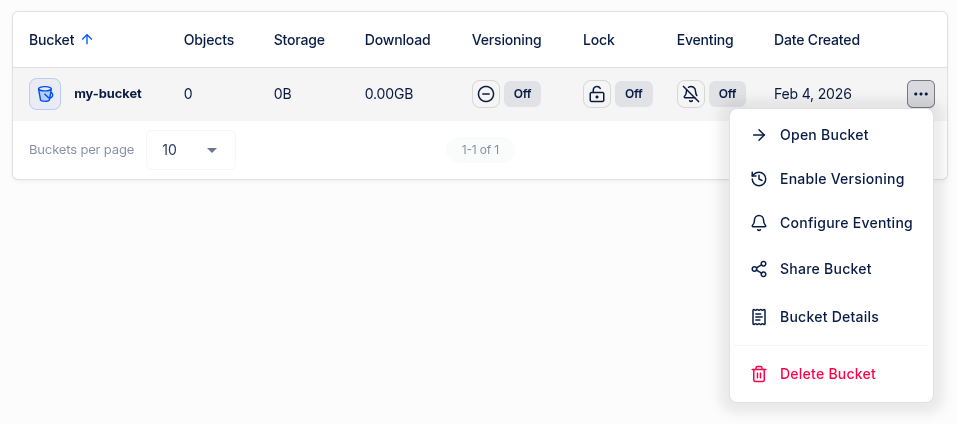
In the Configure Bucket Eventing dialog:
GCP Pub/Sub Topic: Enter the fully-qualified topic name in the format
projects/GCP_PROJECT_ID/topics/TOPIC_IDEvent Types: Select which events should trigger notifications:
- All Object Created Events - includes Object Created (Put) and Object Created (Copy)
- All Object Removed Events - includes Object Removed (Delete) and Object Removed (Delete Marker)
- You can also select individual event types in each category
Filter Rules (Optional): Match objects by prefix and/or suffix. For example, set Object Key Prefix to
images/and Object Key Suffix to.jpgto only receive events for JPEG files in the images folder. See Filter Behavior for details.
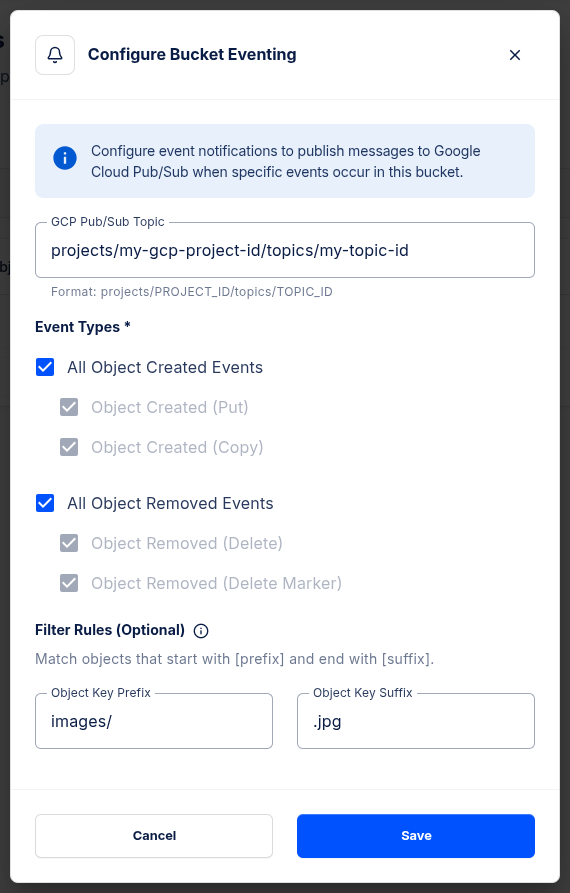
- Click Save to apply the configuration.
Once configured, the Eventing column in the bucket list will show On for buckets with eventing enabled.
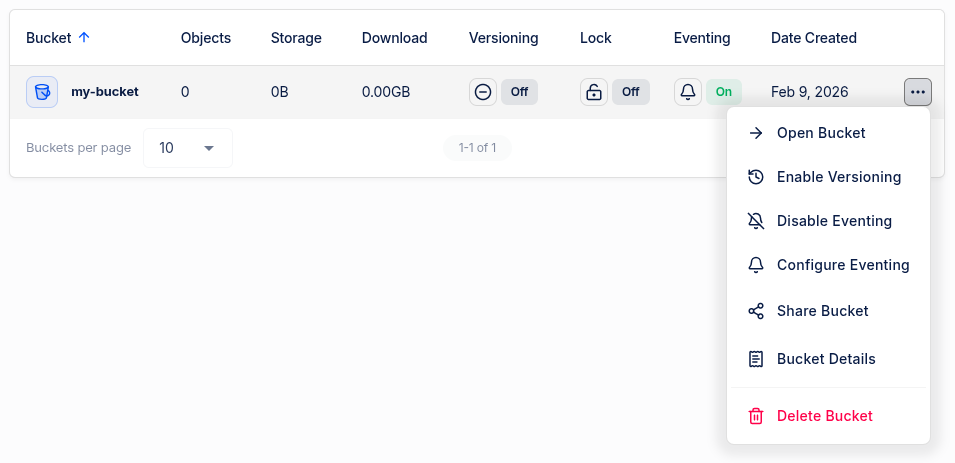
To disable eventing, click the three-dot menu and select Disable Eventing.
Filter Behavior
Filters allow you to receive notifications only for objects matching specific patterns:
- Filters are case-sensitive
- Prefix
logs/matcheslogs/2025.txtbut NOTarchive/logs/file.txt - Suffix
.jpgmatchesphoto.jpgbut NOTphoto.JPGorimage.jpg.bak - When both prefix and suffix are specified, both must match (AND logic)
- Maximum filter length: 1024 characters
Event Message Format
Event notifications follow the S3 event message structure (version 2.1):
Message Fields
| Field | Description |
|---|---|
| eventVersion | Always 2.1 |
| eventSource | Always storj:s3 |
| eventTime | ISO-8601 timestamp when the event occurred |
| eventName | Type of event (e.g., ObjectCreated:Put) |
| configurationId | The ID from your notification configuration |
| bucket.name | Name of the bucket |
| bucket.ownerIdentity.principalId | Your Storj project ID |
| object.key | Object key (path) |
| object.size | Object size in bytes |
| object.versionId | Object version ID |
| object.sequencer | Hex-encoded timestamp for ordering events |
Test Event
When you first configure notifications, Storj sends a test event to verify the destination is reachable:
If the test event fails to publish, the configuration is rejected with an error message.
Setting Up a Webhook
To receive notifications at an HTTPS endpoint, configure a Pub/Sub Push subscription:
Step 1: Create a Push Subscription
- In Google Cloud Console, go to Pub/Sub > Subscriptions
- Click Create Subscription
- Select your topic
- Choose Push delivery type
- Enter your webhook URL (must be HTTPS)
- Configure authentication if needed
- Click Create
Step 2: Verify Your Endpoint
Ensure your webhook endpoint:
- Accepts POST requests
- Returns a 2xx status code on success
- Handles JSON payloads
- Responds within 10 seconds (Pub/Sub timeout)
Example Webhook Handler (Node.js)
Limitations
| Limitation | Description |
|---|---|
| One configuration per bucket | Each bucket supports a single notification configuration |
| Google Pub/Sub only | Only Google Pub/Sub is supported as a destination (no AWS SNS, SQS, Lambda) |
| Storj-managed encryption required | Projects using self-managed encryption are not supported |
| No ETag in events | The object ETag is not included in event messages |
| No user identity | Events do not include information about who performed the action |
Troubleshooting
Configuration Fails with Permission Error
Ensure the Storj service account has the Pub/Sub Publisher role on your topic. Double-check:
- The service account email is correct for your satellite
- The role is granted at the topic level (not the subscription level)
IAM Policy Update Failed (Domain Restricted Sharing)
If you see an error like:
IAM policy update failed The 'Domain Restricted Sharing' organization policy (constraints/iam.allowedPolicyMemberDomains) is enforced. Only principals in allowed domains can be added as principals in the policy.
This occurs when your Google Cloud organization has the Domain Restricted Sharing policy enabled, which prevents adding external service accounts (like Storj's) to your IAM policies.
Solution: You need to add Storj's organization to the allowed domains in your organization policy:
- In the Google Cloud Console, ensure you have the Organization selected (not a project)
- Navigate to IAM & Admin > Organization Policies
- Find and click on Domain restricted sharing (
iam.allowedPolicyMemberDomains) - Click Manage policy
- Under Rules, expand the existing Allow rule
- Click Add value to add a new custom value
- Add
principalSet://iam.googleapis.com/organizations/693710676402(Storj's organization ID) - Click Done, then Set policy
You must have the Organization Policy Administrator role to modify organization policies. If the "Manage policy" button is grayed out, contact your organization administrator.
After updating the organization policy, return to your Pub/Sub topic and grant the Pub/Sub Publisher role to the Storj service account.
Not Receiving Events
- Check your bucket eventing configuration: Use
GetBucketNotificationConfigurationto verify the configuration is set correctly - Check event types: Ensure the event type you expect is in your configuration
- Check filters: Verify your prefix/suffix filters match the objects you're uploading
- Check your subscription: Ensure you have an active subscription to the Pub/Sub topic
- Check Pub/Sub logs: Review Cloud Logging for any delivery errors
Delayed Events
Events are typically delivered within seconds, but may be delayed during:
- High system load
- Network issues between Storj and Google Cloud
Duplicate Events
Due to at-least-once delivery, you may occasionally receive duplicate events. Design your application to handle duplicates idempotently using the sequencer field.
S3 Compatibility
API Methods
| Method | Support |
|---|---|
| PutBucketNotificationConfiguration | Yes |
| GetBucketNotificationConfiguration | Yes |
| PutBucketNotification (deprecated) | Yes |
| GetBucketNotification (deprecated) | Yes (AWS CLI has a known bug with JSON output) |
Destination Types
| Destination | Support |
|---|---|
| Google Cloud Pub/Sub | Yes |
| AWS SNS | No |
| AWS SQS | No |
| AWS Lambda | No |
| AWS EventBridge | No |
Event Types
| Event | Support |
|---|---|
| s3:ObjectCreated:Put | Yes (also emitted for Post and CompleteMultipartUpload) |
| s3:ObjectCreated:Post | No (emits Put event instead) |
| s3:ObjectCreated:Copy | Yes |
| s3:ObjectCreated:CompleteMultipartUpload | No (emits Put event instead) |
| s3:ObjectCreated:* | Yes |
| s3:ObjectRemoved:Delete | Yes |
| s3:ObjectRemoved:DeleteMarkerCreated | Yes |
| s3:ObjectRemoved:* | Yes |
| s3:ObjectRestore:* | No |
| s3:ReducedRedundancyLostObject | No |
| s3:Replication:* | No |
| s3:LifecycleExpiration:* | No |
| s3:LifecycleTransition | No |
| s3:IntelligentTiering | No |
| s3:ObjectTagging:* | No |
| s3:ObjectAcl:Put | No |
Filters
| Filter | Support |
|---|---|
| Key prefix filter | Yes |
| Key suffix filter | Yes |
Other Features
| Feature | Support |
|---|---|
| Number of configurations per bucket | Only one |
| Test events on configuration | Yes |
Cost Considerations
Bucket eventing incurs costs on Google Cloud for Pub/Sub usage, including throughput and message storage. See the Google Cloud Pub/Sub pricing page for current rates.
Storj does not currently charge for the bucket eventing feature itself.
Tip: Google Cloud offers a free tier for Pub/Sub. For most use cases, this covers event notification costs.